The roster, the clock and the timesheet in one place.Rostering and timesheet software for cleaning companies.
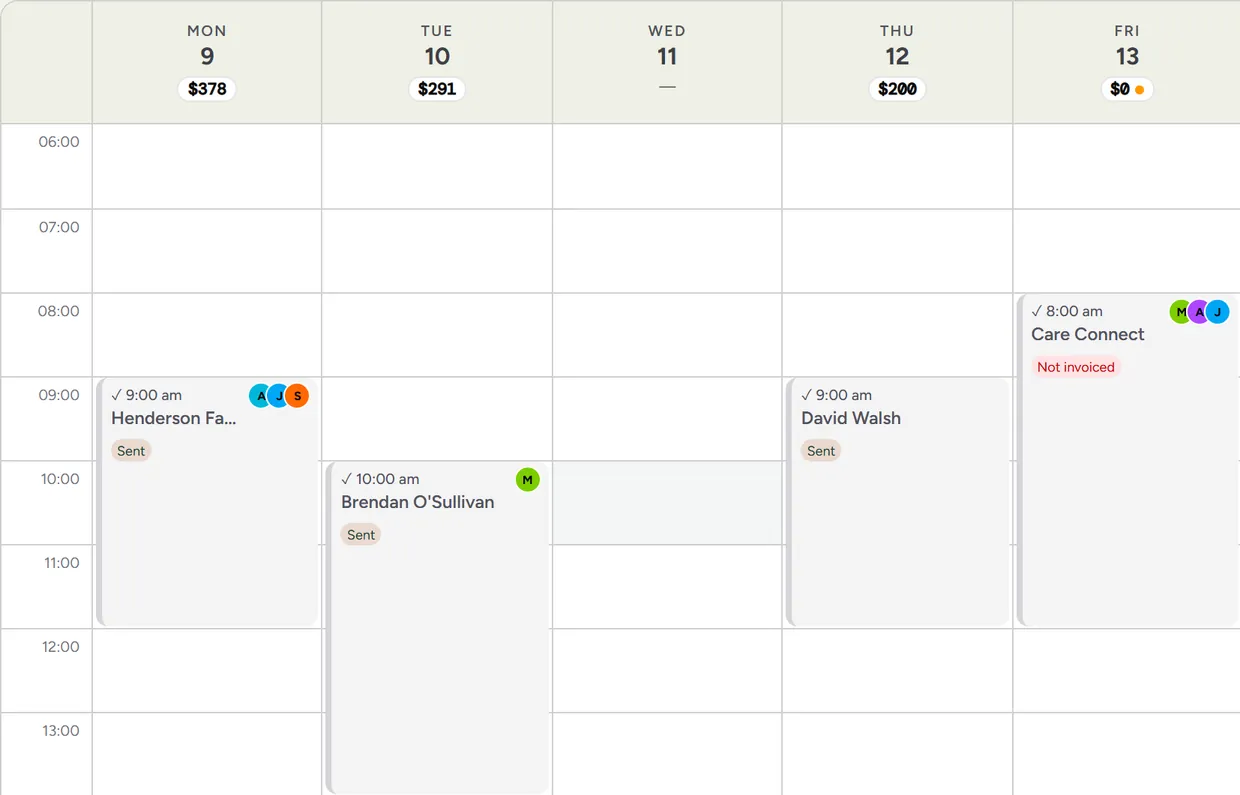
Extrua Dispatch is job software with the roster and the timesheet built in. Roster the regular cleans once, your cleaners clock on from their phones with GPS, and the hours arrive sorted into weekday, Saturday, Sunday and public holiday for whoever does the pay.
- No card to start
- Your first user is free for 14 days
- Month to month. Cancel any time.
Then from A$39 a month for each office user and A$25 for each field user, our founding price for the first 300 users to join Dispatch. The trial starts on Starter; you can change plan any time.
 Built by Steve, who runs his own service business on it every day.
It runs my own commercial cleaning business, every day. It gives me back over 20 hours a week to work on the business.
What the person doing the roster hears all week
Each one usually arrives as a text to the office. Here each has a screen.
“Can we staff Monday and Wednesday nights?”
Room for new work
Pick the days and the time the new work would be, and how many weeks ahead. Each person is shown with the dates they are free, and why they are not on the others: already booked, on leave, or outside their availability. Nothing is booked from it; it is there so you can quote work knowing you can staff it.
“I can't do Fridays any more.”
Availability the cleaner asks for and the office decides
In the crew app each person sees their usual hours and can ask for new weekly hours from a date. The office approves or declines it with the old and new hours side by side, and every visit they are already booked on that the new hours would not cover.
“Nobody's on the Thursday clean.”
A warning before the customer notices
The office is emailed about visits in the next two days that have no one on them. You can change the timing or switch it off.
“How much annual leave have I got?”
Leave balances in the crew app
If you use Xero Payroll, each person linked to their Xero employee sees their own leave balances in the crew app, as at their last processed pay. The office sees everyone's. It only reads: nothing is written to Xero.
“Which of those hours were Sunday?”
Timesheets sorted by the kind of day
Every shift is sorted into weekday, Saturday, Sunday and public holiday hours, using your own public holiday list. Load your state or territory's holidays in one step and add local days such as a show day.
“Are we using the hours we pay for?”
Available, booked and worked
A team report shows each person's available, booked and worked hours by pay week, so a cleaner with room and a cleaner who is stretched both show up.
From the roster to the pay run
Five steps, and the hours are typed in none of them.
Roster the regular cleans once
The cleaner sees their week on their phone
They clock on at the site
Breaks and fixes are on the record
Export the payroll file, then lock the period
Dispatch does not pay anyone and applies no award rates: it hands the hours to whoever does. For the rates themselves, see the cleaning award pay rates lookup.
Three plans for the office, one price for the field
Pay for the cleaners, supervisors and office staff who use the app. The schedule, GPS clock-on and timesheets are on every plan.
Starter
New sign-ups pay A$53 after the first 300 users have joined Dispatch.
- The schedule and recurring cleans
- GPS clock-on that works with no signal
- Timesheets and the payroll file
- Checklists and photos
- Invoicing into Xero
Growth
New sign-ups pay A$57 after the first 300 users have joined Dispatch.
- Everything in Starter
- The AI chat widget for your website
- In-app AI
- Lead-source reports
Pro
New sign-ups pay A$69 after the first 300 users have joined Dispatch.
- Everything in Growth
- SMS from a dedicated business number, set up after your first payment
- The AI voice receptionist
- Intake and consent forms
- Calls, texts and the number are charged on top, as usage
Not sure which? Start on Starter. You can move up or down at any time.
Field user, on any plan · signs in to the staff app only: jobs, clock-on, photos and checklists
A$25 a month for each field userNew sign-ups pay A$36 after the first 300 users have joined Dispatch.
Founding price. It's for the first 300 users to join Dispatch, and yours for as long as you stay.
What a crew costs: You in the office and three on the tools is A$114 a month on Starter (A$39 + 3 × A$25).
Free for 14 days for your first user.
- To add another user you add a card first, and every extra user is billed at your plan's price from the day you add them, for the days left in the trial.
- No card to start. Add one before day 14 and the trial turns into your chosen plan, with your first payment taken then.
- If you don't, your workspace pauses and everything in it is kept.
- We’ll email you before it ends, and your dashboard shows how many days are left.
- Guided onboarding and migration help are there if you want them. No GST is charged.
What the free trial doesn’t include
- A phone number: the AI voice receptionist and texting from your own number start after your first payment.
- The Phone & SMS pack can't be added until the trial has turned into a paid plan.
- Lower sending limits during the trial: up to 150 customer emails and 40 texts a day.
- “Done for you” set-up or a website build: a separate one-off, quoted on its own.
Clients, jobs, quotes and invoices are unlimited on every plan. Compare every plan, feature by feature
Questions about rostering and timesheets
Before you start
Am I locked in?
Can I get my data out?
Who do I talk to?
Do I need a card for the free trial?
How it works for you
What software do cleaning companies use for rostering and timesheets?
Can cleaners see their roster on their phone?
Does it do payroll?
Does it work out award rates?
Can staff change their availability themselves?
Can I roster a night clean that runs past midnight?
How much does it cost?
Keep reading
- Extrua Dispatch: everything it does, and every plan
- How to schedule recurring cleaning jobs
- GPS clock-on for cleaning crews
- How to choose cleaning business software
Comparing tools?
By kind of business
- Trades
- Commercial & strata cleaning
- Home & end-of-lease cleaning
- Pest, pool & window rounds
- Pest control
- Electricians
- Plumbers
- End-of-lease cleaning
- Carpet cleaning
- Childcare centre cleaning
- Office cleaning
- Strata cleaning
By the job you need done
Running the roster from a spreadsheet?
Tell us how many cleaners you roster, how they record their hours now, and what you use for pay. We'll show you the schedule and the timesheet and let you judge whether they fit.
- hello@extrua.com.au
- Based in
- Australia
- Sign-up
- Self-serve, or guided onboarding if you want a hand