Every office clean, on the record.Office cleaning software for contractors who clean after everyone has gone home.
Extrua Dispatch is office cleaning software for cleaning contractors. Night cleans sit on one schedule, each checklist must be ticked before a visit is done, every clean keeps its clock-on record, and each office gets a monthly report it can print. Overseas it is called janitorial software.
- No card to start
- Your first user is free for 14 days
- Month to month. Cancel any time.
Then from A$39 a month for each office user and A$25 for each field user, our founding price for the first 300 users to join Dispatch. The trial starts on Starter; you can change plan any time.
 Built by Steve, who runs his own service business on it every day.
It runs my own commercial cleaning business, every day. It gives me back over 20 hours a week to work on the business.
What an office manager asks, and the screen for each
Nobody watches an office clean happen. The contract is kept on what you can show the next morning.
“Was anyone here last night?”
A clock-on record for every clean
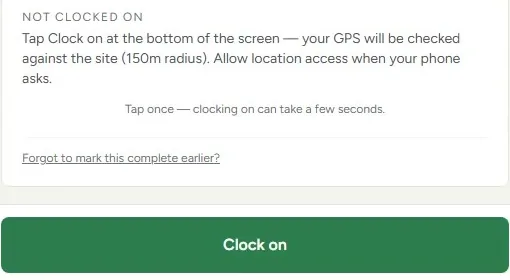
The cleaner clocks on and off from their phone. Each clean keeps the time and the phone's location, and it works in a basement or a lift lobby with no signal.
“The kitchen wasn't done.”
Checklists that must be ticked
Required items stop a visit being marked done until they are ticked, and an item can need its own photo. A cleaner who can't do one marks it with why.
“What did we get for the money this month?”
The monthly service report
One page per office per month: visits done, checklist items ticked, shared inspection scores, and site issues raised and resolved. Your client sees it in their portal and can print it.
“Who has our swipe card and the alarm code?”
A keys register and sealed codes
The keys register shows where each key, fob and card is now, and every hand-over is in the history. Alarm codes sit in sealed access notes: a cleaner sees them only for a visit they are on, on the day, and every opening is recorded.
“Accounts won't pay without a PO.”
POs on every invoice
Mark a client as needing a PO and an invoice without one waits as a draft, saying why, instead of going out. The reference goes to Xero with the invoice.
“Send us your insurance before you start.”
The compliance pack
One printable page per client: your insurance certificates (a lapsed one is flagged before you send it), what is cleaned and how often, the chemicals used, your SWMS, and who cleans at the site.
One office contract, from the first night to the invoice
A month at one office, in the order it happens.
Set the contract once
The cleaner clocks on at the office
The checklist follows the specification
Anything wrong is reported from the phone
A complaint has somewhere to go
The month ends with a report and an invoice
Cleaning strata buildings as well? See strata cleaning software. Warehouses and mixed contracts are on the commercial cleaning software page.
Three plans for the office, one price for the field
Pay for the cleaners, supervisors and office staff who use the app. Offices and clients cost nothing to add.
Starter
New sign-ups pay A$53 after the first 300 users have joined Dispatch.
- Recurring contracts and night cleans
- Clock-on that works with no signal
- Checklists with required and photo-needed items
- The client portal with the monthly report
- Invoicing into Xero
Growth
New sign-ups pay A$57 after the first 300 users have joined Dispatch.
- Everything in Starter
- The AI chat widget for your website
- In-app AI
- Lead-source reports
Pro
New sign-ups pay A$69 after the first 300 users have joined Dispatch.
- Everything in Growth
- SMS from a dedicated business number, set up after your first payment
- The AI voice receptionist
- Intake and consent forms
- Calls, texts and the number are charged on top, as usage
Not sure which? Start on Starter. You can move up or down at any time.
Field user, on any plan · signs in to the staff app only: jobs, clock-on, photos and checklists
A$25 a month for each field userNew sign-ups pay A$36 after the first 300 users have joined Dispatch.
Founding price. It's for the first 300 users to join Dispatch, and yours for as long as you stay.
What a crew costs: You in the office and three on the tools is A$114 a month on Starter (A$39 + 3 × A$25).
Free for 14 days for your first user.
- To add another user you add a card first, and every extra user is billed at your plan's price from the day you add them, for the days left in the trial.
- No card to start. Add one before day 14 and the trial turns into your chosen plan, with your first payment taken then.
- If you don't, your workspace pauses and everything in it is kept.
- We’ll email you before it ends, and your dashboard shows how many days are left.
- Guided onboarding and migration help are there if you want them. No GST is charged.
What the free trial doesn’t include
- A phone number: the AI voice receptionist and texting from your own number start after your first payment.
- The Phone & SMS pack can't be added until the trial has turned into a paid plan.
- Lower sending limits during the trial: up to 150 customer emails and 40 texts a day.
- “Done for you” set-up or a website build: a separate one-off, quoted on its own.
Clients, jobs, quotes and invoices are unlimited on every plan. Compare every plan, feature by feature
Questions office cleaning contractors ask
Before you start
Am I locked in?
Can I get my data out?
Who do I talk to?
Do I need a card for the free trial?
How it works for you
What is the best office cleaning software for a small contractor?
Is there an office cleaning app for the cleaners?
Is Dispatch janitorial software?
Can a night clean run past midnight?
What can the office manager see?
How much does it cost?
Keep reading
- Extrua Dispatch: everything it does, and every plan
- How to choose cleaning business software
- GPS clock-on for cleaning crews
- How to schedule recurring cleaning jobs
Comparing tools?
Other kinds of business
- Trades
- Commercial & strata cleaning
- Home & end-of-lease cleaning
- Pest, pool & window rounds
- Pest control
- Electricians
- Plumbers
- End-of-lease cleaning
- Carpet cleaning
- Childcare centre cleaning
- Strata cleaning
By the job you need done
Tendering for an office, or switching over?
Tell us how many offices you clean, who you report to at each one, and what you use now. We'll show you the checklist and the monthly report and let you judge whether they fit your contracts.
- hello@extrua.com.au
- Based in
- Australia
- Sign-up
- Self-serve, or guided onboarding if you want a hand